

Sayonara Music Player is a fast and easy-to-use music player for Linux. The player is written in C++ and is compatible with the Qt framework and uses Gstreamer as its audio backend.
Although Sayoanra is considered a lightweight music player , it has many features for organizing even large music collections. Furthermore, this application is a good alternative to players like Rhythmbox, Clementine, or Amarok.
Sayonara focuses primarily on performance , low CPU usage, and low memory consumption. That's why it's not like larger, more well-known audio players.
This great player has all the main features that every player should have , plus it has some additional functions, among which we can highlight.
Sayonara comes with a simple interface , support for dynamic playlists, a built-in equalizer, audio tag editing support, lyrics search, cover art download, two themes, and a few other options.
Sayonara player characteristics.
- It has support for many music formats and playlists
- Has a searchable media library
- Directory view
- External device support
- Gender organization
- Tabbed Playlist View
- Dynamic playback
- Has an intuitive user interface
- Shortcut keys
- Integration with desktop notification, sound menu integration and media key integration
- albumart
- Internet stream with services like SoundCloud and Last.fm
- Podcast and Internet radio support
Sayonara's integration with the desktop is excellent, as it automatically adds itself to the system tray icon and not only there, but also to the sound menu for quick access, thus giving you quick access to the player in the top or bottom panel.
This is one of the features that I have loved, as not all players perform this action.
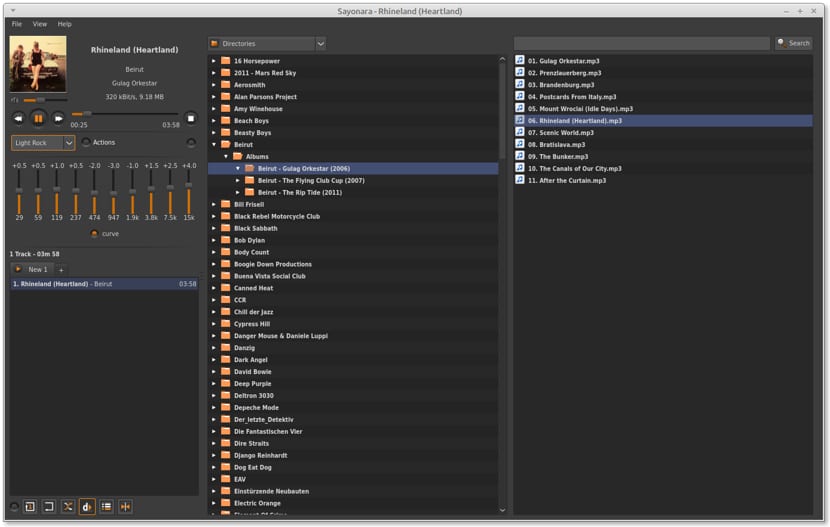
How to install Sayonara music player on Linux?
Sayonara is a Linux-exclusive media player , so it has support for almost all major Linux distributions , which is why we can find it in the official repositories of our favorite distribution.
Although we also have the option of installing the player compiled from its source code.
How to install Sayonara on Ubuntu and derivatives?
In the case of Ubuntu and derivatives, it is necessary to add the official Sayonara repository to the system, for this we must open a terminal and execute the following commands.
First we add the repository with:
sudo apt-add-repository ppa:lucioc/sayonara
Then it is necessary to inform the system that there is a new repository and it must be synchronized:
sudo apt-get update
Finally, we only install the player with the following command:
sudo apt-get install sayonara
How to install Sayonara on Fedora, openSUSE, CentOS and derivatives?
From Fedora 21 you can find Sayonara in the repositories, for its installation we must open a terminal and write the following
sudo dnf install sayonara
How to install Sayonara on Mageia Linux?
Like Fedora, we find the player within the Mageia repositories, for its installation we just type:
urpmi sayonara
How to install Sayonara on Arch Linux, Manjaro and derivatives?
For Arch Linux and derivatives the player is not within the official repositories, this is found in yaour, so to be able to install it on our system it is necessary to have it.
For the Sayonara installation we only have to type the following:
yaourt -s sayonara-player
How to install Sayonara from source code?
If you decide to install the player from its source code, we just have to download and install it, for this we do it in the following way.
git clone -b master https://git.sayonara-player.com/sayonara.git sayonara-player

mkdir -p build && cd build

cmake .. -DCMAKE_INSTALL_PREFIX=/usr -DCMAKE_BUILD_TYPE="Release"

make

sudo make install
I have not tried the player a little, although I honestly prefer Clementine over all, Sayonara has caught my attention.
If you know of any other player that is similar to Sayonara, don't forget to share it with us in the comments.